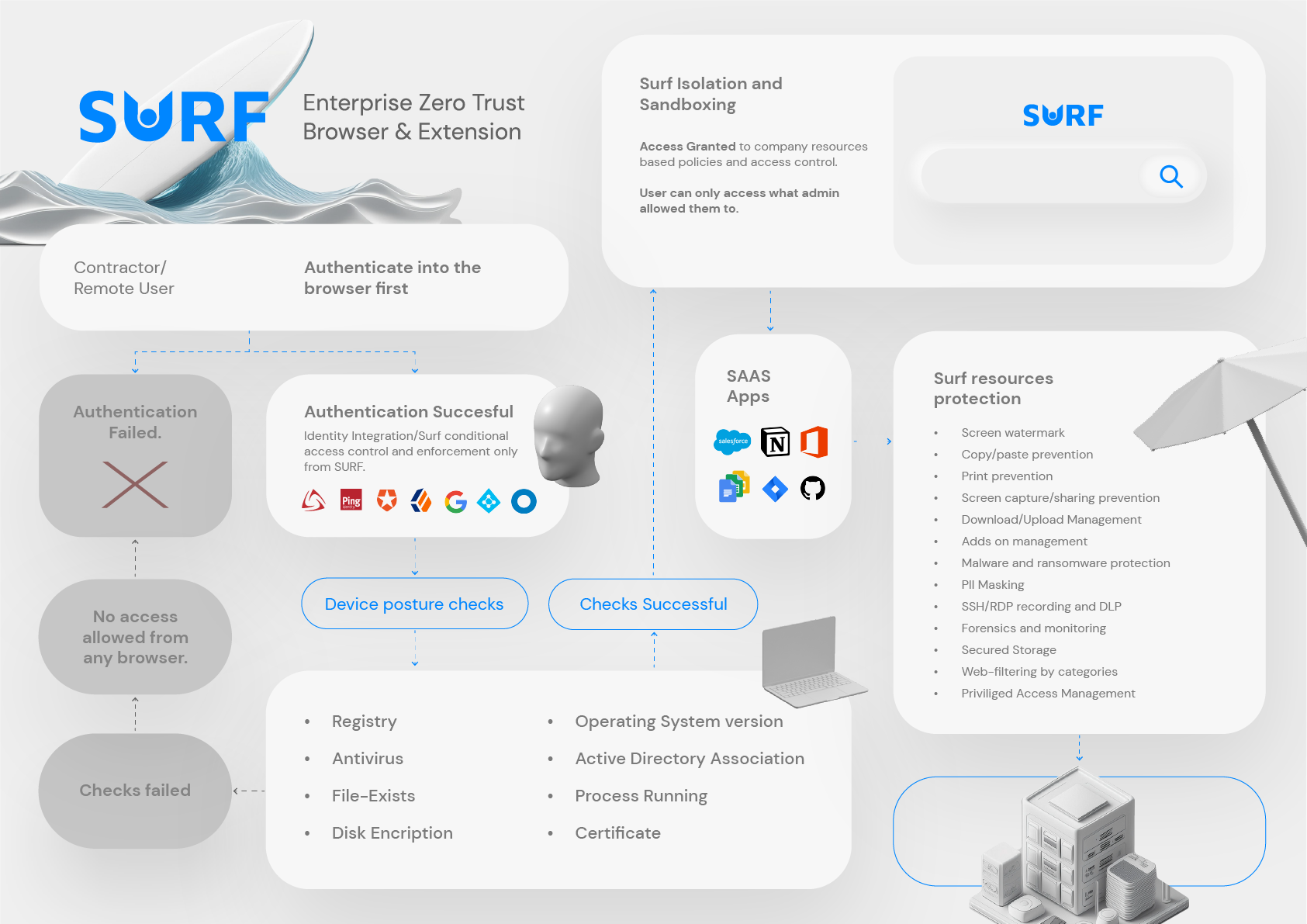
Secure Browser: Why Enterprises Need It in 2026
Enterprise security teams no longer have the luxury of treating the browser as a simple productivity tool. In 2026, the browser is where employees access SaaS, internal apps, partner portals, developer tools, customer data, and generative AI platforms. It is also where attackers increasingly focus their efforts through phishing, malicious extensions, session hijacking, credential theft, shadow IT, and browser-based malware delivery.
For CIOs, CISOs, IT leaders, compliance teams, and DPOs, this creates a strategic question: if most work now happens in the browser, why is the browser still one of the least controlled parts of the enterprise stack?
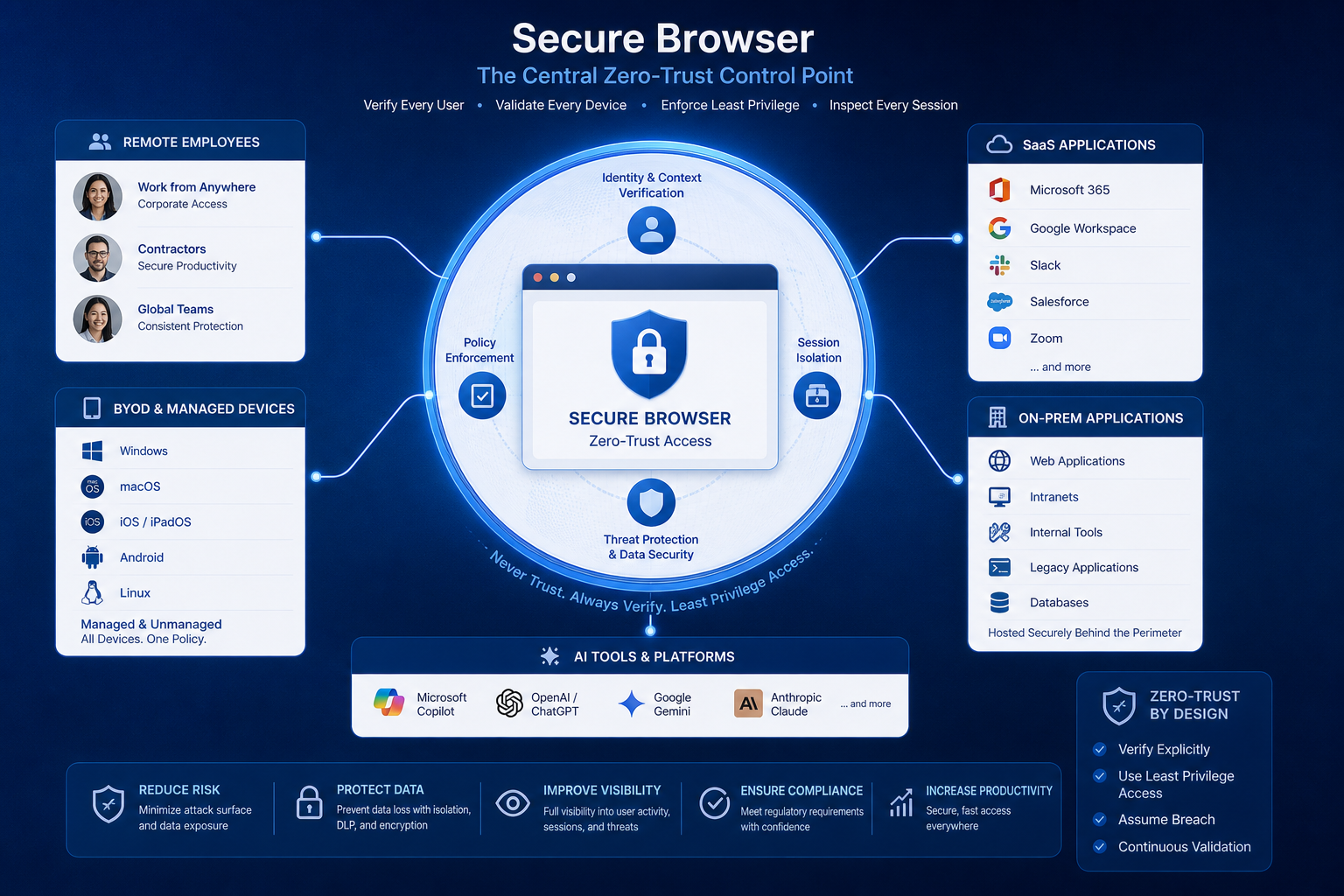
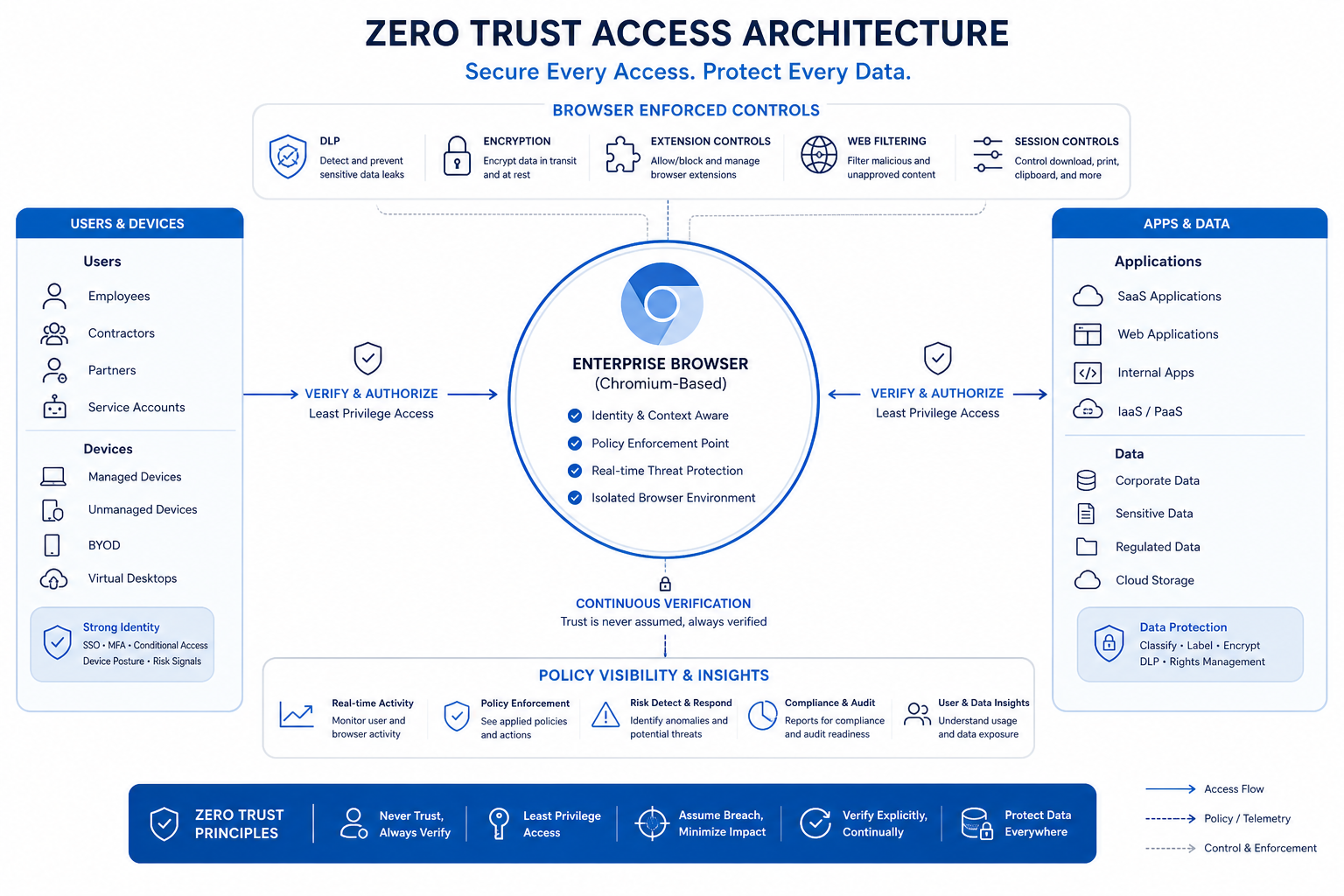
A secure browser answers that question by turning the browser into a zero-trust control point. Instead of relying on fragmented layers of VDI, RBI, VPNs, proxies, and endpoint workarounds, a secure browser gives organizations direct visibility and control over users, sessions, applications, extensions, and data movement. That is especially important in SaaS-heavy, hybrid, contractor-driven, and BYOD environments where traditional security boundaries are no longer reliable.
"According to Gartner, by 2028, 25% of organizations will augment existing secure remote access and endpoint security tools by deploying at least one secure enterprise browser (SEB) technology to address specific gaps." - Source
"In 2025, browser-based phishing attacks surged by 140% year-over-year, with 752,000 incidents identified." - Source
What Is a Secure Browser?
A secure browser is a browser designed to enforce enterprise security policies directly at the point where work happens: the web session itself. Unlike consumer browsers that prioritize convenience and general privacy, a secure browser is built for organizational control, risk reduction, compliance, and safe access to corporate resources.
In practice, a secure browser can include:
-
Centralized policy management
-
Secure access to SaaS and private applications
-
Browser extension auditing and control
-
Phishing and malware protection
-
Data loss prevention
-
Web filtering and URL controls
-
Session visibility and logging
-
Encryption and isolation technologies
-
Controls for managed, lightly managed, and unmanaged devices
Gartner defines secure enterprise browsers as solutions that deliver enterprise security policies through a centrally managed browser extension and, in some cases, a full enterprise browser stack. That distinction matters because modern organizations need flexibility: some users need a full enterprise browser, while others may require browser-level controls on existing devices and browsers.
Why the Browser Has Become the New Security Perimeter
The old enterprise perimeter was the corporate network. That model worked when users were mostly on managed laptops inside offices, connecting to applications hosted in a private data center.
That is not how work happens now.
Today, users operate across:
-
Remote and hybrid work models
-
Personal and BYOD devices
-
SaaS applications
-
Cloud consoles
-
Third-party contractor access
-
Cross-border travel
-
AI copilots and generative AI tools
-
Browser-based admin panels and internal portals
All of that activity converges in the browser. If the browser is where users authenticate, upload, download, copy, paste, share, and interact with sensitive data, it naturally becomes the most important enforcement point in modern security architecture.
The Core Problem With Traditional Browsers in the Enterprise
Traditional browsers were not designed to carry enterprise security programs. Even with policy management, plug-ins, endpoint agents, and network controls layered on top, the browser remains a high-risk blind spot.
1. Traditional Browsers Expand the Attack Surface
Consumer-grade browsers give attackers multiple entry points:
-
Phishing pages
-
Session token theft
-
Malicious redirects
-
Browser exploits
-
Drive-by downloads
-
Watering hole attacks
-
Credential harvesting
-
Malicious browser extensions
-
Man-in-the-browser techniques
Security teams can add secure web gateways, DNS filtering, CASB controls, and endpoint detection, but these tools often lack the direct browser-session context needed to stop user actions in real time.
2. They Struggle in BYOD and Unmanaged Environments
A traditional browser on a personal device creates serious control problems. Security teams often cannot confidently enforce:
-
File download restrictions
-
Clipboard controls
-
Screenshot prevention
-
Extension hygiene
-
Session logging
-
SaaS access policies
-
Device posture-based access
This is exactly where zero-trust browser architecture becomes valuable. It applies control at the browser level, not just at the endpoint or network layer.
3. They Create Policy Fragmentation
Many organizations still piece together browser protection through a stack like this:
|
Security Need |
Legacy Approach |
Common Problem |
|---|---|---|
|
Secure remote access |
VPN |
Broad network exposure |
|
App isolation |
VDI/RBI |
Cost, latency, poor UX |
|
Web filtering |
Proxy/SWG |
Limited session-level action control |
|
Data protection |
DLP point tools |
Inconsistent enforcement across apps |
|
Identity protection |
SSO + MFA |
No browser-native behavioral control |
|
Browser risk |
Extensions or GPOs |
Weak visibility into actual browser activity |
The result is more tools, more overhead, more policy drift, and more user frustration.
What a Secure Browser Does Differently
A secure browser is not just a hardened version of Chrome. It is a strategic control plane for workforce access and data protection.
Centralized Visibility and Control
A secure browser gives administrators one place to define and enforce policies across:
-
Users
-
Devices
-
Browsers
-
SaaS apps
-
Private apps
-
Data flows
-
Extension ecosystems
-
Web destinations
This allows security teams to apply rules based on identity, posture, geography, device type, risk, app, or action.
Identity-First Zero-Trust Access
Modern secure browsers support zero-trust principles by validating who the user is, what device they are on, what app they are accessing, and what action they are trying to perform.
Instead of giving a user broad access because they are “on the network,” a secure browser can grant tightly scoped access to the exact web app or workflow needed.
In-Browser Data Protection
This is one of the biggest gaps competitors often underplay. The real value of a secure browser is not only stopping malware. It is governing what users do with data once access is granted.
That includes:
-
Blocking downloads
-
Restricting uploads
-
Preventing copy/paste
-
Controlling print actions
-
Watermarking sessions
-
Limiting screen capture or screen sharing
-
Encrypting session data
-
Applying DLP policies across web apps and GenAI tools
Safer Third-Party and Contractor Access
Third-party access has historically forced security teams into bad choices: overprovision a VPN, spin up a VDI environment, or trust unmanaged devices.
A secure browser offers a cleaner model. Contractors, partners, or developers can access only the required applications through a controlled browser experience, without exposing the broader environment.
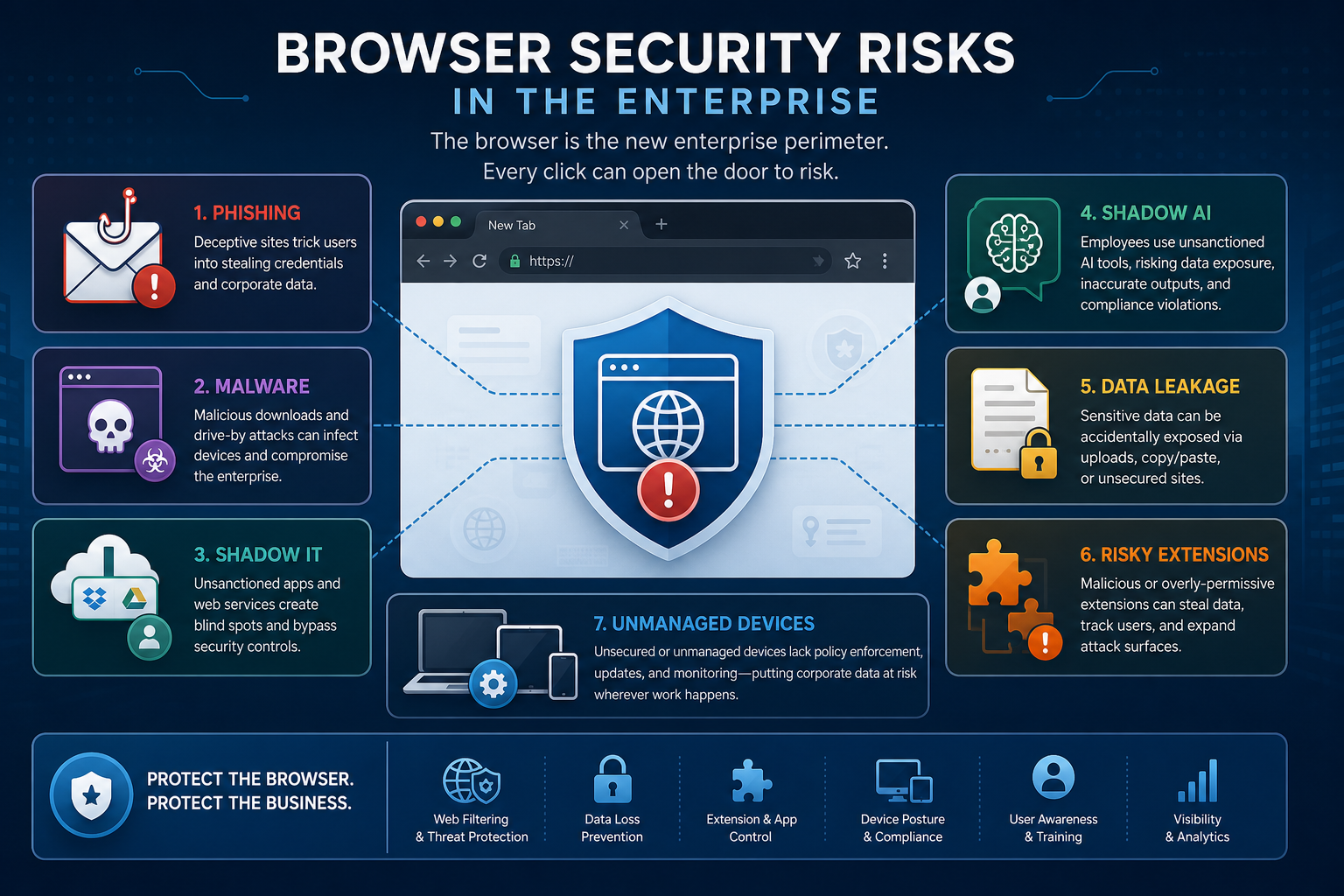
The Risks Enterprises Must Address in 2026
The browser threat landscape has changed. The risks are not limited to malware downloads anymore.
Phishing and Social Engineering
Attackers increasingly target users at the browser layer because that is where credentials are entered, sessions are established, and trusted workflows occur. AI-generated phishing kits, fake login flows, and identity attacks are now more convincing and scalable.
Malicious Browser Extensions
Extensions can quietly gain access to page content, credentials, session information, and user actions. They are one of the most underappreciated risks in enterprise browsing.
A strong secure browser program should include:
-
Extension discovery
-
Risk scoring
-
Approval workflows
-
Blocklists and allowlists
-
Continuous monitoring
Shadow IT and Shadow AI
Employees regularly adopt unsanctioned SaaS tools and AI services in the browser. This creates data leakage and compliance issues, especially when users paste sensitive content into public AI models or upload regulated documents into unknown platforms.
Data Exfiltration Through Normal User Actions
Not all breaches happen through malware. Many happen through ordinary actions that legacy security tools fail to govern well:
-
Copying source code into AI chatbots
-
Uploading customer records to unsanctioned SaaS
-
Downloading financial files to personal devices
-
Printing regulated information
-
Sharing screens during sensitive sessions
A secure browser helps stop these actions without forcing the organization into cumbersome legacy infrastructure.
How Secure Browsers Fit Into Zero-Trust Architecture
A secure browser is not a standalone gimmick. It fits naturally into a modern zero-trust strategy.
Zero Trust Starts With the Session
Zero trust is fundamentally about never assuming trust based on location or device alone. The browser session is where trust decisions should be continuously enforced.
A secure browser enables:
-
Identity-aware access
-
Device-aware policies
-
App-level segmentation
-
Continuous session monitoring
-
Real-time policy enforcement
-
Least-privilege access to web and SaaS resources
It Reduces Dependency on Legacy Access Tools
A major strategic advantage is simplification. Secure browsers can reduce or even replace parts of:
-
VDI
-
RBI
-
VPNs
-
Proxies
-
Legacy web isolation stacks
-
Complex remote access infrastructure
This does not mean every organization will rip out everything overnight. But it does mean the browser can become the more efficient front line for many workflows.
It Improves User Experience
Security tools fail when users avoid them. A secure browser built on Chromium gives organizations a familiar experience with less friction than legacy remote access technologies.
That matters because better security adoption often depends on:
-
Fast startup
-
Low latency
-
Familiar tabs and navigation
-
Smooth SaaS performance
-
Minimal workflow disruption
Why BYOD and Hybrid Work Make Secure Browsers Essential
BYOD is now a permanent reality in many organizations, whether officially approved or quietly tolerated. Hybrid work only amplifies the problem.
The BYOD Challenge
On personal devices, IT often cannot or should not impose full endpoint management. But sensitive work still happens there.
A secure browser provides a middle path:
-
Secure access without full device enrollment
-
App-level control without exposing the whole network
-
Data protection without full endpoint takeover
-
Better privacy boundaries between personal and work usage
The Hybrid Work Challenge
Hybrid workers move between office, home, travel, and customer sites. Traditional controls tied to corporate networks or static endpoint posture do not adapt well to this fluid environment.
A browser-centric security model is better aligned to how modern work actually happens.
Compliance and Privacy: Why the Browser Matters More Than Ever
This is another area where many articles stay too generic. Compliance is not just a reporting function. It is increasingly tied to browser-level behavior.
Organizations operating under GDPR, CCPA, PCI-DSS, HIPAA, ISO 27001, SOC 2, and zero-trust frameworks need to control how sensitive data is accessed, viewed, handled, and transferred.
A secure browser supports compliance by helping enforce:
-
Least-privilege access
-
Audit trails
-
Session logging
-
Data handling restrictions
-
Encryption standards
-
Browser extension governance
-
Geographic and contextual policy controls
-
Access from unmanaged or contractor devices without overexposure
For regulated organizations, the browser is often where noncompliant behavior begins. That makes it a vital place to enforce policy.
Key Features to Look for in a Secure Browser
Not all products in the category are equal. Some are browser extensions. Some are full enterprise browsers. Some emphasize isolation. Others emphasize SaaS governance or zero-trust access.
Here is a practical evaluation framework.
Feature Checklist
|
Capability |
Why It Matters |
|---|---|
|
Centralized policy management |
Enables consistent control across users and environments |
|
Browser extension control |
Reduces risk from malicious or overprivileged extensions |
|
SaaS and private app access |
Supports modern work across cloud and on-prem resources |
|
DLP controls |
Prevents data leakage through downloads, uploads, clipboard, and print |
|
Web filtering and malware protection |
Blocks risky destinations and malicious content |
|
Session logging and auditability |
Supports investigations and compliance requirements |
|
BYOD and unmanaged device support |
Secures work without full endpoint control |
|
Identity provider integration |
Aligns browser access with SSO, MFA, and identity signals |
|
Low performance impact |
Preserves user adoption and productivity |
|
GenAI and agentic AI controls |
Governs emerging AI workflows and data exposure |
Where SURF Security Fits In
Organizations evaluating the category should look beyond feature checklists and ask a bigger question: which secure browser platform actually simplifies security while improving control and user productivity?
SURF Security is built around that exact principle.
SURF Security’s Strategic Advantage
SURF Security transforms the browser into a secure zero-trust access point. Instead of asking enterprises to bolt together more infrastructure, it makes the browser itself the control plane for users, devices, applications, and data.
That creates several practical advantages:
-
Reduces attack surface and exposure to phishing, malware, and social engineering
-
Minimizes dependency on VDI, RBI, VPNs, proxies, and other complex legacy tools
-
Enables fast deployment and simpler administration
-
Provides centralized visibility across users, devices, apps, and data
-
Secures both SaaS and on-premise application access
-
Supports any device model, including BYOD and contractor access
-
Preserves productivity through a familiar Chromium-based experience
-
Enforces DLP, encryption, extension management, web filtering, and granular policy controls
-
Helps support compliance and privacy requirements
-
Extends security to GenAI and agentic AI workflows
Why That Matters in Real Enterprise Environments
The strongest secure browser solutions do more than “protect browsing.” They give enterprise teams a way to modernize access and reduce operational sprawl.
That is the bigger story in 2026. Security teams are overloaded with disconnected tools, policy conflicts, and brittle access models. SURF Security offers a more direct architecture: secure the browser, secure the work.
Secure Browser vs Traditional Security Stack
A Practical Comparison
|
Category |
Traditional Browser + Legacy Stack |
Secure Browser Approach |
|---|---|---|
|
User access |
VPN or broad network trust |
App- and session-level zero-trust access |
|
BYOD support |
Limited, risky, or intrusive |
Controlled access from managed and unmanaged devices |
|
Data protection |
Multiple overlapping tools |
Native browser-level DLP and action controls |
|
Extension risk |
Hard to monitor consistently |
Centralized extension governance |
|
SaaS visibility |
Partial across point products |
Direct insight into browser-based activity |
|
User experience |
Often slow or fragmented |
Familiar Chromium experience |
|
Deployment complexity |
High |
Lower and faster in many use cases |
|
AI usage control |
Usually weak |
Better policy enforcement for GenAI workflows |
Content Gaps Most Competitor Articles Miss
Many high-ranking pieces cover product comparisons, market movement, and broad feature sets. But they often miss what enterprise decision-makers really need to understand.
Gap 1: The Browser Is a Data Control Layer, Not Just a Threat Layer
Many articles frame secure browsers mainly as anti-phishing or isolation tools. That is incomplete. Their real strategic value is controlling how users interact with data across SaaS, web, private apps, and AI tools.
Gap 2: Secure Browsers Help Simplify Architecture
Competitor coverage often describes secure browsers as “one more security product.” In practice, the best platforms can replace or reduce dependence on older infrastructure that is expensive and difficult to manage.
Gap 3: AI Governance Is Now a Browser Security Issue
Generative AI and agentic AI workflows happen in the browser. If your browser strategy does not include AI input/output control, sensitive data governance, and visibility into AI usage, it is already behind.
Gap 4: User Productivity Is a Security Requirement
Security controls that slow people down get bypassed. Browser-native security is compelling because it aligns stronger policy enforcement with a lower-friction experience.
How to Evaluate a Secure Browser for Your Enterprise
Ask These Questions Early
-
Does it support both SaaS and private application access?
-
Can it secure BYOD and unmanaged devices without invasive endpoint control?
-
How strong are its DLP and data handling controls?
-
Can it manage browser extensions centrally?
-
Does it integrate with your identity stack and compliance workflows?
-
Can it reduce reliance on VPN, VDI, RBI, or proxies?
-
What visibility does it provide into user and session activity?
-
How does it handle GenAI and agentic AI use cases?
-
What is the real user experience under normal workflows?
-
How quickly can it be deployed across distributed teams?
Prioritize Business Outcomes, Not Just Features
A secure browser should help you achieve measurable outcomes:
-
Lower phishing and credential theft exposure
-
Better governance of SaaS and AI usage
-
Safer third-party access
-
Reduced infrastructure complexity
-
Faster onboarding for remote users
-
Stronger compliance posture
-
Better user satisfaction than legacy remote access models
Final Verdict: Why Enterprises Need a Secure Browser in 2026
The secure browser is no longer a niche category. It is becoming a foundational control point for modern enterprise security.
In a world defined by distributed work, SaaS sprawl, BYOD, third-party access, shadow AI, and rising browser-based attacks, traditional browsers simply do not provide the visibility, control, or resilience enterprises need. The browser has become the place where trust is established, data is handled, and risk materializes.
That is why forward-looking organizations are moving toward browser-centric zero-trust security. And that is why SURF Security is so relevant right now. By transforming the browser into a secure access point, SURF helps enterprises reduce attack surface, simplify architecture, enforce compliance, and protect users without sacrificing performance or usability.
If your organization is still trying to secure modern work with yesterday’s network perimeter model, 2026 is the year to rethink it. The most effective place to start is the browser.
Want to see what a zero-trust browser can do for your environment? Explore SURF Security and evaluate how quickly you can replace complexity with direct control, better visibility, and safer enterprise access.
FAQ
What are the benefits of using a secure browser?
A secure browser gives enterprises centralized control over web sessions, user actions, data movement, and extension risk. It helps reduce phishing, malware, and data leakage while supporting zero-trust access, BYOD security, compliance, and better user productivity.
What is the future of a web browser?
The future of the browser is as a primary enterprise security control point, not just a productivity app. As work, SaaS access, and AI usage increasingly happen in-browser, organizations will use secure browsers to enforce identity, policy, and data protection directly at the session layer.
Is Brave browser good in 2026?
Brave can be a strong privacy-focused consumer browser, but it is not the same as a full secure enterprise browser. Large organizations typically need centralized policy enforcement, DLP, extension governance, audit logging, and secure access controls that go beyond consumer privacy features.
What is a secure enterprise browser?
A secure enterprise browser is a browser or browser-based control layer that delivers enterprise security policies directly through the browser. It enables secure access to SaaS and private apps, centralized visibility, web session logging, malware protection, extension control, and browser-level data protection.
What is actually the most secure browser?
For enterprises, the most secure browser is the one that combines zero-trust access, strong DLP, extension control, phishing protection, centralized administration, and support for managed and unmanaged devices. In business environments, that usually means an enterprise-focused platform such as SURF Security, not a standard consumer browser.
Why is safe browsing important in the workplace?
Safe browsing is critical because employees access sensitive apps, data, and AI tools through the browser every day. Without browser-level controls, organizations face greater risk from phishing, credential theft, shadow IT, shadow AI, malicious extensions, and accidental data exposure.