Secure Browser Chrome for Enterprise Security
Enterprise leaders searching for a secure browser Chrome strategy are usually trying to solve the same hard problem: how do you protect users, apps, and data when work now happens mostly in the browser?
The challenge is no longer limited to managed laptops inside a corporate office. Security teams now need to secure SaaS apps, private apps, GenAI tools, third-party access, and sensitive data flows across managed devices, unmanaged endpoints, contractors, and BYOD environments. In that reality, the browser becomes far more than a productivity tool. It becomes a control plane.
That is why secure enterprise browsing has moved from niche concept to strategic priority. A modern Chromium-based secure browser can help enforce zero-trust access, phishing protection, malware defense, DLP, extension control, session visibility, and compliance policies directly where users work. And for many enterprises, this approach reduces dependence on bulky legacy stacks like VDI, VPNs, RBI, secure web gateways, and complex proxy architectures.
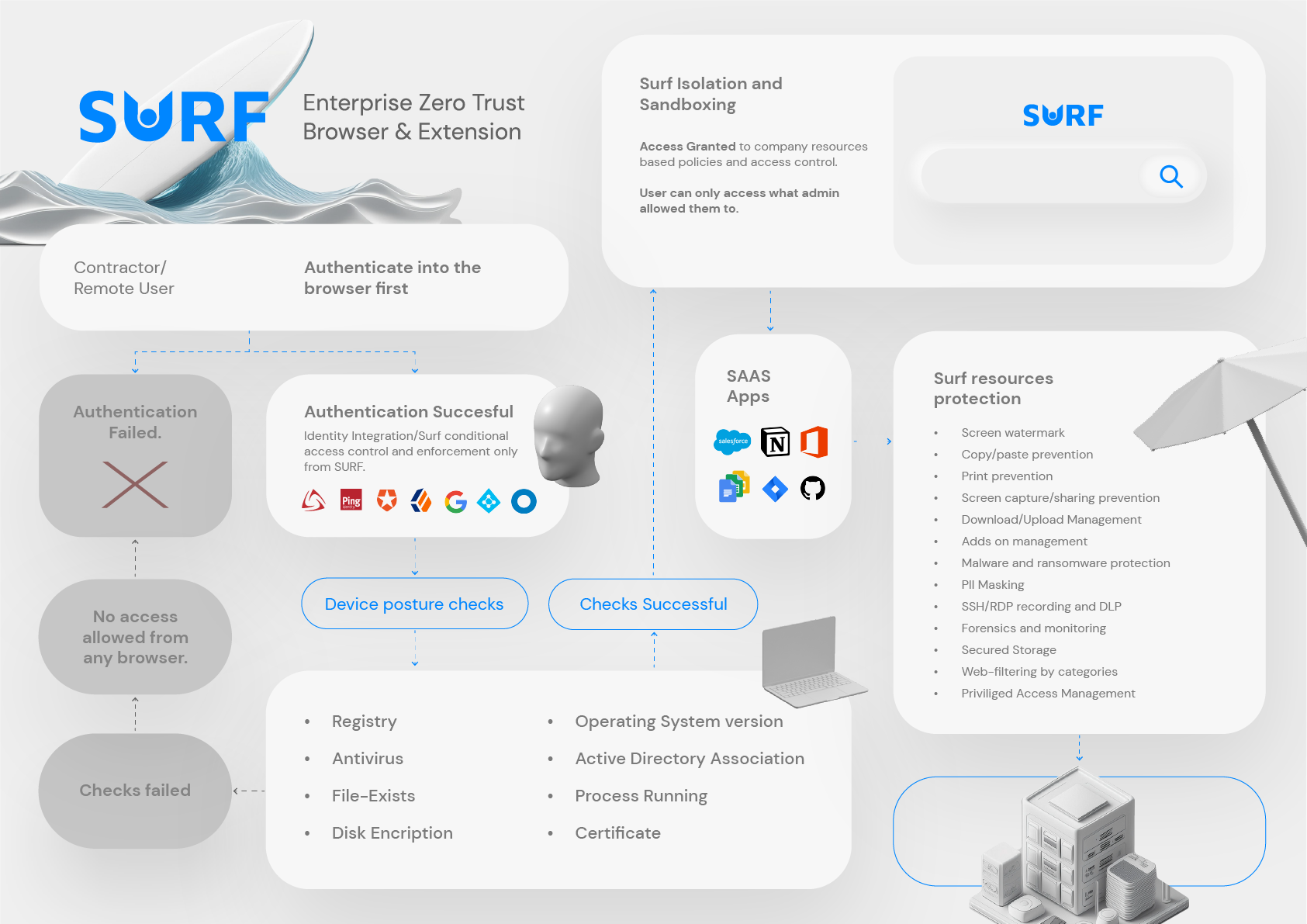
As SURF Security sees it, the future of enterprise security is browser-native. Instead of forcing security through fragmented layers, organizations can transform the browser itself into a secure zero-trust access point with centralized visibility and policy enforcement.
"By 2028, 25% of organizations will augment existing secure remote access and endpoint security tools by deploying at least one secure enterprise browser technology." - Source
"Microsoft detected over 8.3 billion email-based phishing threats in Q1 2026." - Source
What Does “Secure Browser Chrome” Mean?
When people search for secure browser Chrome, they usually mean one of three things:
-
Using Chrome with stronger enterprise policies
-
Using Chrome Enterprise or Chrome Enterprise Premium
-
Using a Chromium-based secure enterprise browser with deeper security controls
Those are related, but they are not the same.
A consumer browser with a few admin settings is not automatically a secure enterprise browser. A true enterprise-grade secure browser should give organizations the ability to:
-
Enforce identity-aware access policies
-
Protect sessions on managed and unmanaged devices
-
Control uploads, downloads, clipboard, printing, and copy/paste
-
Detect and block phishing, malicious pages, and risky web behavior
-
Manage browser extensions centrally
-
Inspect and govern access to SaaS and internal apps
-
Create centralized auditability for compliance and investigations
-
Reduce attack surface without hurting productivity
Gartner’s definition of a secure enterprise browser is useful here: it emphasizes browser-delivered controls, centralized policy management, secure access to web and SaaS apps, session logging, and web content security.
Why the Browser Has Become the New Security Perimeter
Traditional enterprise security was designed around the network and the endpoint. That model breaks down when:
-
Employees work remotely
-
Contractors need temporary access
-
Teams use dozens or hundreds of SaaS apps
-
Sensitive data moves through browser sessions
-
Users access work resources from personal devices
-
GenAI tools introduce new data exposure paths
In most organizations, the browser now touches nearly every critical workflow:
-
Email and collaboration
-
CRM and ERP
-
HR and finance systems
-
Dev tools and internal dashboards
-
File sharing and document workflows
-
AI copilots and agentic systems
If the browser is where work happens, it is also where risk concentrates.
The Main Risks Inside the Browser
Phishing and social engineering
Attackers increasingly target users through browser-based workflows, fake login pages, malicious redirects, and credential harvesting.
Malware and drive-by compromise
Web sessions can expose users to malicious downloads, browser exploits, dangerous scripts, and poisoned content.
Data leakage
Sensitive data can leave through uploads, downloads, copy/paste, printing, screenshots, or unsanctioned AI tools.
Shadow IT and Shadow AI
Employees adopt unauthorized apps and AI services faster than security teams can assess them.
Risky extensions
Extensions can access browser content, credentials, tokens, and data. Poor extension hygiene creates a major blind spot.
Unmanaged-device access
BYOD and contractor use cases create major gaps in endpoint trust and policy consistency.
Chrome Enterprise vs a Secure Enterprise Browser
Chrome Enterprise gives organizations useful management capabilities, and for many businesses it is an important starting point. But security leaders should understand where standard browser management ends and where a dedicated secure enterprise browser approach begins.
What Chrome Enterprise Does Well
Chrome Enterprise helps organizations with:
-
Centralized browser management
-
Policy deployment
-
Extension governance
-
Reporting
-
Automatic updates
-
Integration with identity and device-management ecosystems
Chrome Enterprise Premium extends that with more advanced capabilities such as:
-
Data loss prevention
-
Trusted access controls
-
Real-time URL and file scanning
-
Secure access use cases
These are valuable controls, especially for enterprises already invested in Google’s ecosystem.
Where Enterprises Still Need More
For many high-security, compliance-heavy, or distributed-workforce environments, teams need deeper capabilities such as:
-
Stronger isolation of sensitive sessions
-
More granular control for BYOD and unmanaged devices
-
Easier secure access to on-prem and SaaS apps without complex VPN dependencies
-
Enterprise-wide enforcement of encryption, filtering, and browser policies
-
Better support for contractors and third parties
-
More direct control over data handling in GenAI tools
-
A browser-centered way to simplify legacy infrastructure
This is where a browser-native zero-trust platform like SURF Security becomes strategically different.
What Enterprises Should Look for in a Secure Chromium-Based Browser
The best secure browser Chrome strategy is not just about brand familiarity. It is about whether the browser can function as a true enterprise security layer.
Core Requirements
|
Capability |
Why It Matters |
|---|---|
|
Chromium-based user experience |
Preserves familiarity and minimizes user friction |
|
Centralized management |
Enables consistent policy enforcement at scale |
|
Zero-trust access controls |
Ensures access decisions reflect user, device, and context |
|
DLP controls |
Prevents sensitive data loss via browser actions |
|
Phishing and malware protection |
Blocks web-borne threats in real time |
|
Extension management |
Reduces risk from malicious or unapproved extensions |
|
Web filtering and policy controls |
Limits exposure to risky destinations and behavior |
|
Audit logging and visibility |
Supports investigations, governance, and compliance |
|
BYOD support |
Protects corporate access without requiring full device management |
|
SaaS and private app access |
Covers how modern work actually happens |
Advanced Requirements
|
Advanced Need |
Why It Matters for Enterprises |
|---|---|
|
End-to-end encryption |
Protects sensitive sessions and regulated data |
|
Browser sandboxing |
Reduces exploitability and blast radius |
|
Malicious content rendering |
Safer handling of dangerous web content |
|
GenAI security controls |
Governs prompts, uploads, and exposure to AI apps |
|
Third-party access security |
Enables secure contractor and partner workflows |
|
Compliance mapping |
Supports GDPR, CCPA, PCI-DSS, HIPAA, ISO 27001, SOC, and zero-trust frameworks |
|
Low performance impact |
Security only works if users will tolerate it |
How SURF Security Approaches Secure Enterprise Browsing
SURF Security takes a browser-centric view of enterprise security: the browser is not just where users access work. It is where security, access, data protection, and compliance can be enforced with precision.
Browser as a Zero-Trust Access Point
SURF transforms the browser into a secure zero-trust access point. That means organizations can apply access and data policies directly in the browsing layer rather than depending on a maze of older tools.
This matters because modern work is increasingly:
-
Web-delivered
-
Identity-driven
-
Device-diverse
-
Data-sensitive
-
AI-enabled
Instead of forcing traffic through complex infrastructure, SURF helps enforce security where interaction actually occurs: inside the browser session.
Reducing Attack Surface
A secure browser should not just detect threats. It should reduce exposure in the first place.
SURF helps reduce attack surface by addressing:
-
Phishing and credential theft
-
Malicious downloads and web-borne malware
-
Social engineering vectors
-
Extension-based risks
-
Data exfiltration through browser actions
-
Unsafe use of unsanctioned AI tools
Simplifying the Legacy Stack
Many enterprises are overburdened by overlapping security layers. In the wrong architecture, adding more point products increases complexity without closing the real gap.
A browser-native security model can eliminate or reduce reliance on:
-
VDI
-
RBI
-
VPN
-
Proxies
-
Heavy cloud security chains
-
Operationally complex remote access infrastructure
That simplification has two benefits: better security alignment and lower operational drag.
Key Security Features That Matter Most
Phishing Protection
Phishing remains one of the fastest paths to account compromise and data theft. A secure browser must do more than rely on user awareness training.
A strong secure browser strategy should include:
-
Real-time detection of malicious pages
-
Blocking of known phishing destinations
-
Protection against credential harvesting
-
Safer rendering of suspicious content
-
Policy-based restrictions for risky workflows
SURF’s browser-level approach helps reduce exposure to phishing, malware, and social engineering by placing controls at the exact point of user interaction.
Browser Isolation and Safe Rendering
Browser isolation matters most when enterprises need to contain risky activity without burdening the entire environment.
Done correctly, isolation:
-
Keeps malicious content away from sensitive environments
-
Reduces exploit impact
-
Protects unmanaged endpoints
-
Supports secure contractor and third-party access
But enterprises often do not want isolation that destroys performance or user experience. That is why a modern Chromium-based approach with low performance impact is so important.
Data Loss Prevention
DLP in the browser is now essential because users move data through browser actions all day long.
Critical browser DLP controls include:
-
Blocking copy/paste of sensitive content
-
Restricting file downloads and uploads
-
Preventing printing of regulated material
-
Limiting clipboard use
-
Enforcing safe document handling
-
Governing interactions with GenAI tools
SURF helps enterprises enforce these controls directly in the browser while maintaining productivity.
Extension Management
Extensions are one of the most overlooked enterprise risks. They can introduce hidden access to browser content, tokens, and enterprise workflows.
A secure browser should support:
-
Force-install, allowlist, or blocklist policies
-
Risk scoring and visibility
-
Centralized extension governance
-
Detection of dangerous permissions
-
Fast response to extension-based threats
Web Filtering and Policy Enforcement
Enterprises need browser-native controls to determine:
-
Which websites users can access
-
Which app categories are restricted
-
Which workflows are allowed on unmanaged devices
-
Which sessions require tighter protections
SURF supports centralized policy enforcement across users, devices, apps, and data, helping security teams apply consistent rules without relying on scattered infrastructure.
Secure Browser Chrome for BYOD and Unmanaged Devices
One of the biggest gaps in legacy security is the unmanaged device problem.
Enterprises often need to support:
-
Personal laptops in BYOD programs
-
Contractors using their own machines
-
Third-party service providers
-
Temporary users with limited access needs
-
Distributed workers in hybrid environments
Trying to fully manage all those endpoints is often unrealistic, expensive, or legally difficult.
A secure browser approach is compelling here because it lets organizations apply strong protections without requiring full device control.
Why This Model Works
With browser-level controls, enterprises can:
-
Authenticate users strongly
-
Restrict access by identity and context
-
Limit sensitive browser actions
-
Protect corporate apps on unmanaged devices
-
Keep audit trails for compliance
-
Preserve user privacy better than full endpoint takeover
This is especially relevant for GDPR, privacy-sensitive regions, and contractor-heavy environments.
Secure Access to SaaS and On-Prem Applications
Enterprises no longer need separate security philosophies for cloud apps and internal apps. The browser can unify them.
A strong secure enterprise browser should support:
-
SaaS access control
-
Private app access
-
On-prem application access
-
Zero-trust segmentation
-
Identity-aware session policies
-
Consistent data protection across app types
SURF is built for precisely this mixed reality. It supports secure access to SaaS and on-premise applications from any device, including BYOD, while centralizing control and visibility.
Secure Browser Chrome and Compliance
For many enterprise buyers, the real question is not just “Is it secure?” It is “Will it help us pass audits, enforce policies, and reduce compliance exposure?”
A browser-centric security model can help by giving teams tighter operational control over how data is accessed, moved, and exposed.
Compliance Areas a Secure Browser Can Support
|
Framework / Regulation |
Browser-Level Benefit |
|---|---|
|
GDPR |
Better control of personal data exposure and access logging |
|
CCPA |
Stronger governance over consumer-related data handling |
|
PCI-DSS |
Restriction of sensitive payment data workflows |
|
HIPAA |
Tighter control over access to protected health information |
|
ISO 27001 |
Policy consistency, risk reduction, and audit support |
|
SOC 2 / SOC |
Evidence of controls, logging, and operational discipline |
|
Zero Trust frameworks |
Identity-aware access and continuous control enforcement |
SURF helps organizations support these obligations with centralized control, encryption, DLP, session governance, and visibility across apps, devices, and users.
Shadow IT, Shadow AI, and the Rise of Agentic Workflows
A major gap in many competitor articles is that they focus on classic browser security but underplay the fast-growing AI risk surface.
Today, users are not just visiting websites. They are:
-
Pasting confidential data into LLMs
-
Using AI copilots to summarize internal material
-
Connecting AI tools to SaaS systems
-
Running semi-autonomous agents in browser-based workflows
This creates a new category of browser risk.
Why GenAI Changes the Secure Browser Conversation
GenAI tools can expose:
-
Trade secrets
-
Customer data
-
Regulated content
-
Source code
-
Internal documents
-
Sensitive prompts and business logic
A secure browser must now govern not just websites and files, but also AI interactions.
What Enterprises Need
-
Visibility into AI tool usage
-
Controls over what can be pasted or uploaded
-
Policy-based access to sanctioned vs unsanctioned tools
-
Auditability for AI-driven workflows
-
Protection for autonomous and agentic browser activity
SURF Security is especially relevant here because it extends beyond the classic enterprise browser model into an agentic AI security runtime, helping enterprises secure not just user-driven browsing, but emerging AI-assisted work patterns.
Content Gaps Most Competitor Articles Miss
Many articles covering Chrome Enterprise or secure browsers focus on high-level features. They often miss the practical buying and architecture questions enterprise leaders actually care about.
Gap 1: Browser Security Is Not Just “More Policies”
Competitors often imply that a few browser policies equal enterprise security maturity. They do not. Real enterprise security needs identity-aware access, DLP, extension governance, compliance support, and session-level control.
Gap 2: BYOD Is a First-Class Use Case
Many pieces mention remote work but do not explain how to secure personal or unmanaged devices without overreaching into endpoint management.
Gap 3: Secure Browsers Can Replace Legacy Tools
A lot of articles describe features but avoid the architectural impact. One of the strongest arguments for a secure enterprise browser is that it can reduce or replace layers like VPNs, proxies, RBI, and VDI in selected workflows.
Gap 4: GenAI Security Is Now Core, Not Optional
Most browser security articles still treat AI as separate from browsing. That is increasingly outdated.
Gap 5: User Experience Decides Adoption
If security slows down the browser, users work around it. A secure Chromium-based experience matters because it helps maintain productivity while enforcing controls.
How to Evaluate a Secure Browser for Enterprise Security
Security teams should evaluate secure browser platforms with both technical rigor and operational realism.
Questions to Ask Vendors
-
Can it protect both managed and unmanaged devices?
-
Can it secure both SaaS and on-prem apps?
-
What DLP controls are available in-browser?
-
How are phishing and malicious sites handled?
-
How are extensions governed?
-
Can it reduce dependence on VPN, VDI, RBI, or proxies?
-
What compliance reporting and logging exist?
-
Can it secure GenAI and browser-based AI workflows?
-
What is the performance impact on end users?
-
How fast can it be deployed and managed?
Evaluation Criteria Table
|
Evaluation Area |
What Good Looks Like |
|---|---|
|
Deployment |
Fast rollout, minimal infrastructure burden |
|
Administration |
Simple centralized policy management |
|
End-user experience |
Familiar Chromium-based workflow |
|
Threat protection |
Strong phishing, malware, and web risk controls |
|
Data protection |
Granular DLP and policy enforcement |
|
Access security |
Zero-trust, identity-first controls |
|
Visibility |
Centralized logging and activity insight |
|
Compliance |
Support for auditability and regulatory controls |
|
Modern use cases |
BYOD, contractors, GenAI, third parties |
|
Stack simplification |
Reduced dependency on legacy security infrastructure |
Is Chrome Enough for Enterprise Security?
For some organizations, Chrome Enterprise may be enough as a baseline management and policy layer. But for enterprises with:
-
Strict compliance requirements
-
Sensitive data flows
-
Large contractor ecosystems
-
BYOD-heavy workforces
-
Hybrid and distributed teams
-
SaaS sprawl
-
Growing AI usage
-
Pressure to simplify legacy infrastructure
…a dedicated secure enterprise browser approach is often the better answer.
The right question is not “Should we use Chrome?” It is:
Can our current browser strategy enforce zero-trust access, prevent browser-based data loss, secure unmanaged devices, and govern AI-era workflows without adding more operational complexity?
If the answer is no, it is time to look beyond standard browser management.
Final Verdict: The Best Secure Browser Chrome Strategy Is Browser-Native Zero Trust
The future of enterprise security is increasingly browser-native. Chrome’s broad familiarity and Chromium’s performance advantages make them a strong foundation, but enterprise security leaders need more than convenience. They need control, visibility, resilience, and simplification.
That is where SURF Security stands out.
SURF turns the browser into a secure zero-trust access point for the modern enterprise. It helps reduce exposure to phishing, malware, and social engineering; centralizes policy enforcement across users, devices, apps, and data; supports SaaS and on-prem access from any device; and helps organizations reduce dependence on legacy tools like VDI, RBI, VPN, and proxies.
For enterprises navigating distributed work, BYOD, compliance pressure, Shadow IT, Shadow AI, and emerging agentic AI workflows, that is not just a browser upgrade. It is a security architecture upgrade.
If you want a secure browser Chrome strategy that is built for real enterprise conditions, it is time to evaluate SURF Security.
FAQ
Is there an enterprise version of Chrome?
There is not a completely separate browser called an enterprise Chrome build in the way many people assume. Instead, Chrome Enterprise adds centralized management, reporting, policy controls, and optional premium security features on top of the standard Chrome browser.
How to manage Chrome for Enterprise?
Organizations typically manage Chrome through cloud-based admin controls, policy templates, extension governance, and identity integrations. For deeper security, many enterprises layer in a secure enterprise browser like SURF Security to add zero-trust access, DLP, and stronger protection for BYOD and SaaS workflows.
Why are people ditching Chrome?
Most enterprises are not abandoning Chrome because of usability. They are looking for more security, more visibility, and more control than standard browser management alone can provide, especially for phishing defense, extension risk, unmanaged devices, and AI-related data exposure.
What is the difference between Chrome Enterprise and regular Chrome?
Regular Chrome is the consumer browser experience, while Chrome Enterprise adds business-focused management, reporting, and policy capabilities. Enterprise buyers may still need a dedicated secure browser layer like SURF Security for stronger zero-trust access, DLP, compliance controls, and browser-based protection across BYOD and third-party access.
What is the best enterprise browser?
The best enterprise browser is the one that combines a familiar user experience with strong zero-trust controls, DLP, extension management, threat protection, and compliance support. For organizations that need to secure SaaS, on-prem apps, contractors, BYOD, and GenAI workflows, SURF Security is a compelling modern choice.